Ask Claude about inflation vs. wages since 2000 and it can actually produce a chart. Claude has basic built-in visualization capabilities. But the data behind that chart is unclear. Where did the numbers come from? Are they from the model’s training data, a web search summary, or something it generated to fit the narrative? There’s no source attribution, no way to verify the underlying dataset, and limited control over chart types or formatting. You get a visual, but not one you can hand to a stakeholder and say “here’s where every number came from.”
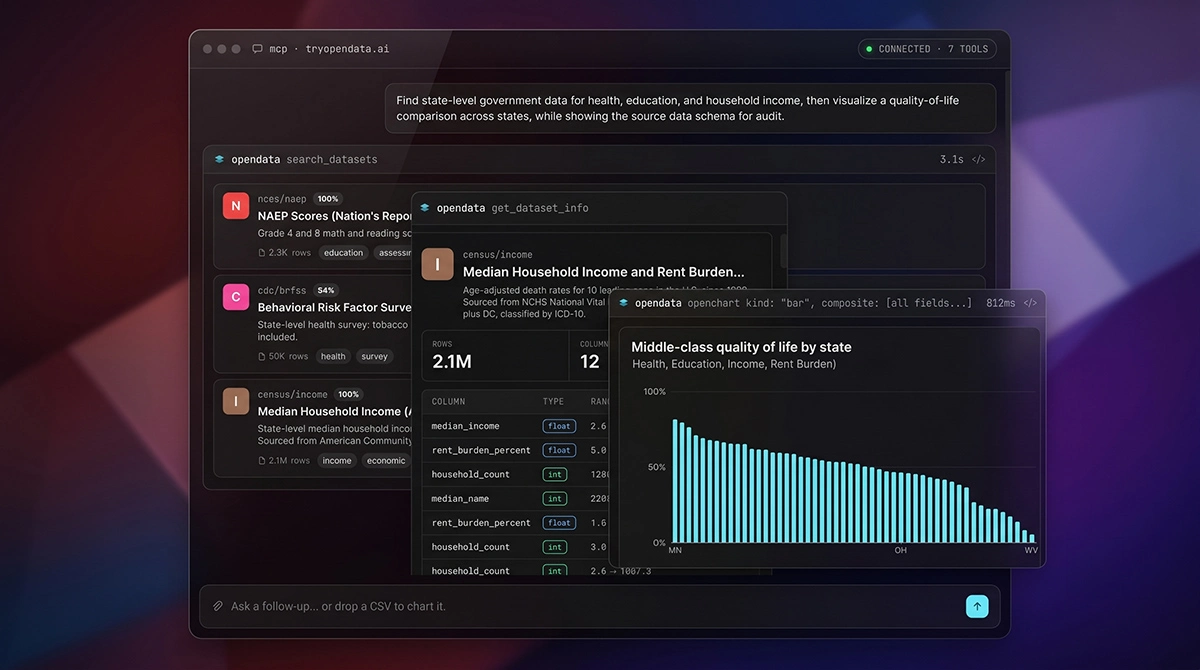
Now ask the same question with the OpenData MCP App connected. You get an interactive line chart rendered inline in the conversation, built from real FRED data, with every data point traceable back to its source. Export buttons (PNG, SVG, CSV), a sortable data table underneath, and source attribution with links to the original datasets. The data is real, the provenance is clear, and the output is consistent every time.
The chart is a live Preact application running in a sandboxed iframe inside Claude’s UI. Users can hover over data points, resize the chart, sort columns, and export the underlying data without leaving the conversation.
The thing that makes this possible is called an MCP App. We shipped one for OpenData over the past month. It took three rendering frameworks, 1,400 lines of deleted auth code, and a fair amount of sandbox debugging. This is the honest account of what that was like.
What MCP Apps are (and aren’t)
MCP (Model Context Protocol) is the standard that lets AI chat clients call external tools. When you connect an MCP server to Claude or ChatGPT, the LLM can call your tools, get structured data back, and use it in conversation. Most MCP servers stop there: the data flows back to the model, and the model decides how to present it to the user (usually as text or a basic chart).
An MCP App adds a visual layer on top. When an MCP tool returns a special field called _meta.ui.resourceUri, supporting clients fetch an HTML bundle from your server and render it in a sandboxed iframe right inside the chat. The tool still returns text content too, so clients that don’t support Apps (or the LLM itself) degrade gracefully to the text version. You get both: structured content for the UI, text for the model.
The default constraint is that your App is a single, self-contained HTML file with all JavaScript, CSS, and dependencies inlined. The spec does support declaring external domains via CSP configuration (resourceDomains for scripts/styles, connectDomains for fetch/XHR), so you could theoretically load Preact from a CDN and keep your bundle lean. In practice, we went with full inlining because host support for these CSP declarations varies across clients, and a self-contained bundle works everywhere without negotiation.
This makes bundle size something you have to actively manage. Every time a tool call returns a resourceUri, the client fetches the full HTML bundle from the server via the MCP protocol’s resources/read method. There’s no built-in caching at the protocol level, so your bundle gets transferred on every tool invocation. The obvious optimization is building separate bundles per view type. Each tool already returns a specific resourceUri (like ui://opendata/chart or ui://opendata/search), and the resources/read handler can serve a different bundle for each URI. A table-only bundle doesn’t need D3 or the charting library, so it could be ~200KB instead of 900KB. That’s code-splitting by route, and the build setup is just multiple Vite entry points. We haven’t done this yet (we shipped with one universal bundle to move fast), but it’s the clear next step. Most tool calls in a typical session aren’t charts, so the payload savings for search results, dataset info, and query views would be significant.
Our bundle is about 900KB (Preact, D3, OpenChart, nine view components, all CSS). That’s roughly the weight of two hero images on a webpage, but it adds up when a conversation triggers five or six tool calls. Keeping the bundle lean directly affects how responsive the App feels.
The @modelcontextprotocol/ext-apps SDK handles communication between the iframe and the host client: theme synchronization, opening links in the host browser, and calling MCP tools back from inside the App.
MCP servers carry a real context cost, and it’s worth understanding where Apps fit in that before choosing this approach. Every MCP server you connect injects its full set of tool descriptions into the LLM’s context window on session start. That’s token budget spent before the user asks a single question. CLI tools and IDE skills don’t have this problem. They use progressive disclosure: the LLM doesn’t load all the documentation upfront, it can run --help to learn a tool’s interface on demand. Skills work the same way, loaded when relevant rather than always present.
So an MCP server needs to justify its context cost. It makes sense when you need remote data behind authentication, or when the server maintains state across requests. A lot of MCP servers in the wild would be better as CLI tools or skills. MCP Apps raise the bar further: they only make sense when you genuinely need interactive UI that can’t be achieved any other way. There’s no CLI or skill equivalent of rendering an interactive chart inside the chat, so the context cost is justified.
Our case: OpenData has over 400 datasets (and growing) from dozens of government data providers. Users ask natural language questions, and the AI queries real data. The MCP App renders search results that link back to dataset pages on OpenData so users can inspect the original source. It shows the SQL queries the agent is running, with deeplinks to the OpenData sandbox where users can run the same query themselves and modify it. Charts include export buttons and source attribution. None of that is possible with text output alone.
Building it
The rendering pipeline
Here’s how a user question becomes a rendered chart. The user asks something like “chart real wages vs. inflation since 2000.” The LLM decides to call the openchart tool and passes along the data rows and field mappings. The tool handler on the MCP server returns three things in one response:
content: text blocks for the LLM (a summary of what the chart shows, so the model can reference it in follow-up conversation)structuredContent: typed JSON for the App (the chart specification, data rows, view type, and rendering options)_meta.ui.resourceUri: aui://opendata/chartURI that tells the client which HTML resource to load
The client sees the resourceUri, fetches the HTML bundle from the MCP server, and renders it in a sandboxed iframe. Inside the iframe, Preact boots, connects to the host via the SDK, receives the structuredContent, reads the _view field to determine which component to render, and routes to the chart view.
One HTML bundle serves all of our ui:// URIs (chart, table, search results, dataset info, and more). The client can preload a URI before the tool call completes, but they all serve the same bytes. The routing happens inside the bundle based on the _view field in the structured content.
The mental model that helped us the most: structured content is the contract between your server and your App. Text content is the contract between your server and the LLM. Both come from the same tool call, but they serve different consumers.
The sandbox you don’t control
The first version of the MCP App was imperative DOM manipulation. About 1,500 lines of document.createElement chains across eight view files. It worked, but it was painful to maintain and nearly impossible to test individual views in isolation. So we migrated to Lit, a web component framework with a solid type system and component model.
Lit worked perfectly in our dev harness. Every view rendered correctly, the component lifecycle was clean, and we had proper type checking across the whole tree. Then we tested in Claude Desktop.
SyntaxError: Failed to execute 'write' on 'Document': Invalid or unexpected tokenThe cause took hours to track down. Claude Desktop renders MCP Apps by creating an iframe, getting a reference to contentDocument, and calling doc.write(html) to inject the bundle. This is an unusual approach, but it’s within spec for how iframes can work. The problem is that Lit also uses document.write internally during custom element registration. Two document.write calls on the same document collide, and the browser throws.
We couldn’t fix it without forking Lit. We couldn’t work around it because the document.write call happens during Lit’s initialization, before any of our code runs. So we reverted the entire migration and started evaluating alternatives.
Preact was the answer. A minimal 15KB proof-of-concept rendered cleanly through the same sandbox that threw on Lit. Preact has no document.write dependency. The full migration preserved everything we’d built: typed view contracts, the adapter pattern for testability, animation sequencing, the chart edit lifecycle. Function components map naturally from Lit’s class-based model, and the bundle actually got smaller (Preact is about 12KB base vs. Lit’s 18KB).
Three rendering frameworks in two weeks, all because of how the host loads your HTML.
The takeaway: your MCP App runs in a sandbox you don’t control. The host client decides how to load your HTML, and it might do something unusual. Your dev harness catches component bugs. Only the real client catches environment bugs. Test in the actual client early.
The dev loop (no hot reload)
The framework churn would have been even worse without the dev harness. Here’s the pattern that makes it work.
Views in our MCP App never import the SDK directly. They consume a HostAdapter interface through Preact context:
interface HostAdapter {
  readonly theme: "light" | "dark";
  openLink(url: string): void;
  updateModelContext(content: Array<{ type: "text"; text: string }>): void;
  callServerTool(name: string, args: Record<string, unknown>): Promise<Result>;
}
In production, the adapter wraps the @modelcontextprotocol/ext-apps SDK. In the dev harness, it’s a stub that returns fixture data and logs calls to the console. Same views, same component tree, completely different runtime.
We didn’t build this for clean architecture points. The iteration loop for testing against the real client goes like this: edit your Preact components, rebuild the single-file bundle, restart the MCP server (which serves the bundle), and start a brand new conversation in Claude Desktop. There’s no hot module replacement. No live reload. New conversation, every time. If you want to see how a chart handles empty data or a long title, that’s a full rebuild cycle each time.
The dev harness is a standalone Vite dev server running at localhost, completely outside of Claude Desktop or any AI client. It’s just a browser tab rendering your Preact components with hot reload, no MCP session, no iframe sandbox, no protocol overhead. Gallery mode renders all nine views at once. You can flip between light and dark themes with a toggle. The harness is where we do 95% of development work. The real client is for smoke tests.
Auth: the 1,400-line mistake
The MCP spec describes OAuth 2.1 for authentication. Early in development, the examples and reference implementations showed MCP servers acting as their own OAuth Authorization Servers. So that’s what we built: Dynamic Client Registration, authorize endpoint, callback handler, token exchange, opaque token storage. Over 1,400 lines of auth code.
We already had Clerk handling auth for the rest of the platform. But it wasn’t obvious at the time that Clerk could handle the MCP auth flow directly. The spec technically described how to do this, but all the examples showed MCP servers doing auth themselves, so that’s what we followed.
Then we stepped back and realized we’d built a second copy of something Clerk already does. Clerk handles user login, issues tokens, publishes the keys clients need to verify those tokens. The MCP server doesn’t need to do any of that. It just needs to check that the token a client sends is legit. One discovery document pointing clients to Clerk, one token verification check. That’s it.
We deleted all 1,400 lines and replaced them with about 50 lines of token verification.
Now that Clerk handles auth directly, most users never think about any of this. They connect to the MCP server, Clerk handles the login flow, and it just works. We also support API keys as a fallback for clients or workflows where OAuth isn’t practical, but Clerk auth is what 99% of people use because there’s nothing to configure.
Sessions die (and come back)
MCP sessions are stateful and in-memory. Each session is a transport-plus-server pair that lives for the duration of the connection. They don’t survive server restarts, and they don’t survive the user closing their laptop and reopening it two hours later.
This creates two distinct problems. The first is sleep/wake: the user closes their laptop, the session expires, and when they come back, the MCP App is frozen on a loading skeleton with no recovery path. We added explicit handlers for every failure mode (onclose, onerror, ontoolcancelled) plus a 15-second loading timeout that surfaces a “connection lost” hint instead of spinning forever.
The second is the cold start problem. Claude Desktop saves conversations to disk. When the app cold-starts, it loads previous conversations and starts sending requests with old session IDs from sessions that no longer exist. We initially returned 404 for unknown session IDs. Users saw broken conversations with no way to recover.
The fix was transparent session auto-recovery. When a request arrives with a session ID the server doesn’t recognize, the server checks what kind of request it is. If it’s an initialize request, we create a fresh session (the client is already doing the right thing). If it’s a regular request like tools/call, we bootstrap a fresh session via a synthetic initialize handshake, then forward the original request to the new session. Concurrent requests with the same stale session ID share a single recovery bootstrap so we don’t create duplicate sessions.
Once transparent recovery worked, the session TTL became a memory management knob rather than a user-facing failure mode. We can set it short (2 hours) to clean up idle sessions without worrying about breaking anything. If a stale session comes back to life, recovery handles it.
What’s still missing
Setup friction
As of May 2026, here’s what installing an MCP App looks like across clients:
| Client | Install method | Consumer-ready? |
|---|---|---|
| Cursor | One-click deeplink | Yes |
| VS Code | One-click deeplink | Yes |
| Claude (claude.ai) | Connectors UI, paste URL | Close |
| Claude Desktop | Settings UI (buried) or JSON config | Close |
| Windsurf | Edit JSON config | No |
| ChatGPT | Manual config | No |
The bottleneck is client-side, not server-side. Our setup docs lead with the easiest path (Claude’s Connectors UI), provide one-click deeplink buttons for Cursor and VS Code, and hide the config-file steps behind “prefer to do it manually?” accordions. We got it as close to consumer-friendly as the protocol allows.
Claude Desktop does have a GUI for adding MCP servers in its settings, but it’s buried deep enough that most users won’t find it without guidance. A journalist or policy researcher is not going to navigate nested settings menus or edit a JSON config file. Until MCP clients support universal deeplink install (something like claude://mcp/install?url=...&name=OpenData), MCP Apps are a developer-audience product. That’s fine for now. It won’t be fine forever.
What we’d do differently
Budget more time for auth than you think. We spent more time on auth than on the rest of the server combined. OAuth is worth it because it makes setup painless for users, but the MCP auth spec was still changing while we built against it. Common patterns that should have worked didn’t, examples pointed one direction while the spec described another, and when things broke, the error messages were usually nonexistent. Better documentation and a more stable spec would have saved us weeks.
Test in the real client sandbox on day one. The dev harness is essential for fast iteration, but the Lit crash would have shown up immediately if we’d loaded a simple test bundle in Claude Desktop before building out the full component tree. Make a “hello world” bundle, load it in the real client, confirm it renders. Do that before you pick a framework.
Build the dev harness before the first component. Our first 1,500 lines of imperative DOM code had no harness. Every change meant rebuilding the bundle, restarting the server, and starting a new conversation in Claude Desktop. The harness turned a 3-minute feedback loop into a sub-second one. Over weeks of development, that adds up fast.
Where this is headed
The rough edges are all on the ecosystem side. Auth specs still shifting, sandbox behavior that varies by client, install flows that need too many steps. That will improve as the protocol matures and clients converge on deeplink install. The server-side story is pretty stable.
If you’re building an MCP server and your tools just return data, you don’t need an App. But if your users keep asking questions that produce walls of text when what they need is a chart, that’s the gap MCP Apps were built for. Just test in the real client before you fall in love with a framework.